

Start your mornings with a perfectly brewed cup of coffee courtesy of your trusty Cuisinart coffee maker. This sleek and efficient appliance has become a staple in many households, delivering that much-needed caffeine boost to kickstart your day. But did you know that there’s more to this machine than just brewing delicious java? That’s right – it also comes equipped with a handy clock feature! In this blog post, we’ll show you why it’s essential to set the clock on your Cuisinart coffee maker and provide you with a step-by-step guide on how to do so. So, grab your favorite mug, and let’s get started!
Why is it essential to set the clock on your coffee maker?

Setting the clock on your Cuisinart coffee maker may seem small and insignificant, but it plays an essential role in your daily routine. Here’s why:
- Timely brewing: By setting the clock on your coffee maker, you can ensure your morning coffee cup is ready when needed. Waking up to the aroma of freshly brewed coffee can kickstart your day and save you precious time.
- Convenience: Imagine stumbling into the kitchen half-awake, only to find that you have to fumble with buttons and settings to start your coffee. With a correctly set clock, all it takes is a simple button press, and voilà! Your caffeine fix awaits.
- Energy savings: Many modern coffee makers have programmable features to schedule brewing times. This means you can set it overnight and wake up to hot coffee without leaving the machine running unnecessarily.
- Consistency: If you enjoy their coffee at specific times throughout the day or if multiple people use the same machine, having an accurate clock ensures everyone gets their brew exactly when they want it.
While setting the clock on your Cuisinart Coffee Maker may seem trivial. Its importance lies in providing convenience, energy savings, and consistent brewing times for all users while ensuring timely cups of delicious caffeinated goodness are always within reach!
Step-by-Step Guide on How to Set the Clock
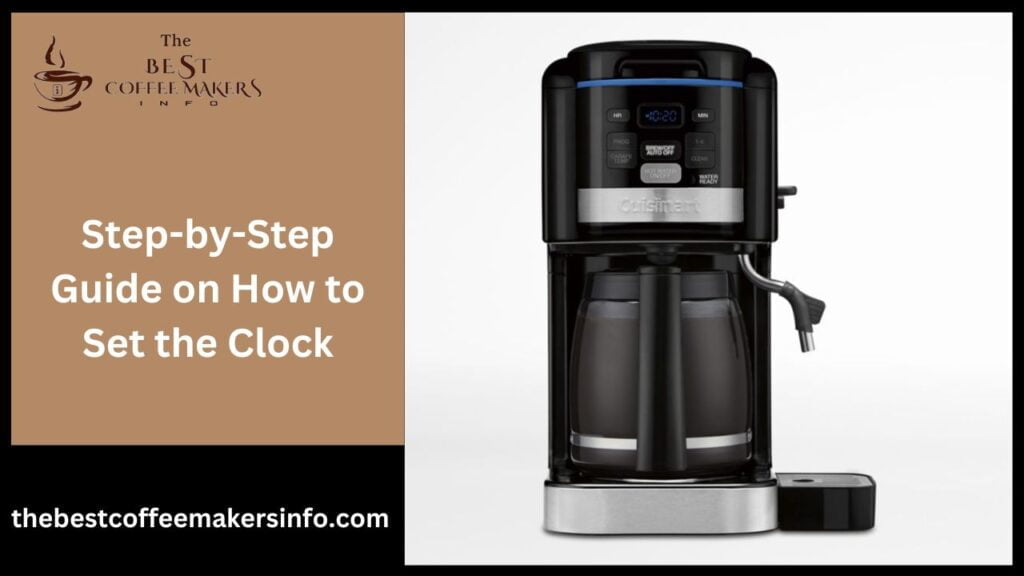
Step 1: Locate the Clock Button
To begin setting the clock on your Cuisinart coffee maker, you must find the clock button. This button is typically located on the machine’s control panel, along with other buttons and settings.
Step 2: Press and Hold
Once you’ve found the clock button, hold it for a few seconds. This action will activate the clock setting mode on your coffee maker.
Step 3: Adjust Hours and Minutes
After activating the clock setting mode, you can now adjust the hours and minutes using either arrows or buttons designated for this purpose. Press these buttons until you reach your desired time.
Step 4: Set AM or PM
Some models require you to set whether AM or PM after adjusting hours. Use the additional buttons provided to select between AM and PM if necessary.
Step 5: Confirm Time
Once you have set both hours and minutes (including AM/PM if applicable), confirm your selection by pressing a “Set” or “Confirm” button on your Cuisinart coffee maker.
Remember that these steps may vary depending on your specific model of Cuisinart coffee maker. Refer to your product manual for detailed instructions tailored to your machine.
Setting up the clock is just one part of maintaining a functional Cuisinart coffee maker! Don’t forget regular cleaning routines like descaling and rinsing out used grounds from filters and keeping an eye out for any potential issues that may arise in daily use!
Tips for Maintaining and Using Your Coffee Maker

Proper maintenance is essential to keep your Cuisinart coffee maker running smoothly and producing delicious coffee. Here are some tips to help you maintain and use your coffee maker effectively.
- Clean Regularly: Cleaning your coffee maker regularly is crucial for optimal performance. After each use, rinse the carafe, filter basket, and lid with warm soapy water. Wipe the exterior of the machine with a damp cloth. Deep clean your coffee maker once a month using vinegar or a descaling solution recommended by Cuisinart.
- Use Filtered Water: Water quality affects the taste of your brewed coffee. Use filtered or bottled water instead of tap water to enhance flavor and prevent mineral buildup in your machine.
- Proper Storage: When not in use, store your coffee maker in a cool and dry place to avoid any damage or exposure to moisture that could impact its functionality.
- Choose Quality Beans: Invest in high-quality beans for better-tasting coffee. Avoid oily beans, as they can clog the grinder over time.
- Correct Coffee-to-Water Ratio: Follow the recommended ratio provided by Cuisinart for brewing excellent cups of Joe every time.
- Turn Off Auto-Shutoff Feature: If you often need more time between brews than the auto-shutoff feature allows, consider turning it off or adjusting it according to your preferences.
By following these simple tips, you can ensure maximum enjoyment from your Cuisinart coffee maker while keeping it well-maintained for years to come!
Troubleshooting Common Issues with Setting the Clock

Having trouble setting the clock on your Cuisinart coffee maker? Don’t worry, you’re not alone! Many users encounter common issues when setting the clock on their coffee maker. But fear not because I’m here to help you troubleshoot and overcome these challenges!
One problem that typically arises is a blank display or an unresponsive control panel. A power outage or improper electrical connections can cause this. To fix this, check if your coffee maker is plugged in correctly and ensure that there is no loose connection.
Another issue users face is difficulty understanding the instructions provided in the user manual. Sometimes, the language used can be confusing or unclear. In such cases, searching for online tutorials or video guides that demonstrate how to set the clock step by step may be helpful.
Additionally, some coffee makers have specific requirements for setting the clock. Such as entering a particular mode before accessing the time settings. Read your instruction manual thoroughly to understand any additional steps required.
If all else fails and you still can’t set the clock on your Cuisinart coffee maker. Don’t hesitate to contact customer support for assistance. They are trained professionals who can guide you through troubleshooting steps explicitly tailored to your model of coffee maker.
Remember that patience is critical when dealing with technical difficulties. Take your time and follow each step carefully until you successfully set the clock on your Cuisinart coffee maker!
Stay tuned for more tips on maintaining and using your beloved Cuisinart coffee maker in our next blog section!
Other Features of Cuisinart Coffee Maker

Aside from its clock-setting capabilities, the Cuisinart coffee maker boasts many other features that enhance your brewing experience. Let’s delve into some of these exciting functionalities!
- Adjustable Brew Strength: Tailor your coffee to suit your taste preferences by selecting the brew strength option on the control panel. Whether you prefer a bold and robust cup or a milder blend, this feature allows you to customize each pot.
- Programmable Brewing: With its 24-hour programmability feature, you can wake up to the enticing aroma of freshly brewed coffee every morning. Set the desired time for your brew cycle, and voilà! Your favourite brew will be ready when you are.
- Auto Shut-Off: Ever worried about leaving the house in a rush and forgetting to turn off your coffee maker? Fret no more! The Cuisinart coffee maker comes equipped with an auto shut-off function that powers down after a specific period of inactivity, ensuring energy efficiency and peace of mind.
- Easy-to-Clean Design: Cleaning up after enjoying a delicious cup of Joe is hassle-free with the removable parts and dishwasher-safe carafe included with most models. No need to spend valuable time scrubbing away — pop them in the dishwasher for effortless maintenance.
- 3-Year Warranty: Cuisinart offers a 3-year limited warranty on their coffee makers, providing added assurance and peace of mind for your purchase. Dripless Pour Spout: Say goodbye to messy countertops thanks to Cuisinart’s dripless pour spout design, which prevents unwanted drips or spills while pouring that perfect cup.
These are just some highlights among many other innovative features offered by Cuisinart Coffee Makers designed with convenience and functionality in mind! So why settle for ordinary when you can enjoy an exceptional brewing experience?
Remember, there’s so much more than meets the eye when owning a Cuisinart Coffee Maker – explore all its impressive features today!
FAQ’s
Q: How do I clean The Coffee Maker?
Cleaning The Coffee Maker is essential for maintaining its performance and extending its lifespan. Start by unplugging the machine and allowing it to cool down. Then, remove any removable parts, such as the brew basket, carafe, and water reservoir, and wash them with warm, soapy water. Use a soft cloth to wipe down the exterior of the machine. For stubborn stains or buildup, you can use a mixture of equal parts water and white vinegar to clean the interior components. After cleaning, rinse all parts thoroughly with clean water and allow them to dry before reassembling the coffee maker.
Q: Why is The Coffee Maker not brewing properly?
If The Coffee Maker is not brewing properly, there could be several reasons for this issue. First, ensure that the water reservoir is properly filled and that there are no blockages or leaks in the machine’s internal components. Check the brew basket for any leftover coffee grounds or debris that may be affecting the brewing process. Additionally, check the power source and ensure that the machine is plugged in correctly. If the problem persists, refer to the user manual for troubleshooting tips or contact customer support for assistance.
Q: How do I program The Coffee Maker to brew at a specific time?
To program The Coffee Maker to brew at a specific time, first, ensure that the machine is plugged in and turned on. Then, refer to the user manual for instructions on how to access the programming menu. Typically, you’ll need to press the “Program” or “Timer” button to set the desired brew time. Use the arrow buttons to adjust the hours and minutes, then press “Set” or “Confirm” to save the programmed time. Once programmed, The Coffee Maker will automatically brew coffee at the specified time. Remember to add water and coffee grounds before the programmed brew time.
Q: Can I use The Coffee Maker to brew tea or hot water?
Yes, you can use The Coffee Maker to brew tea or hot water for other beverages. To brew tea, simply place tea bags or loose tea leaves in the brew basket instead of coffee grounds and follow the same brewing process. For hot water, fill the water reservoir with water and run a brewing cycle without adding any coffee grounds or tea. The hot water will be dispensed from the machine’s spout, ready for use in making tea, instant soups, or other hot beverages.
Q: How do I descale The Coffee Maker?
Descaling The Coffee Maker is important for removing mineral deposits and buildup that can affect its performance. To descale the machine, you can use a commercial descaling solution or a mixture of equal parts water and white vinegar. Pour the descaling solution into the water reservoir and run a brewing cycle without coffee grounds. Repeat this process if necessary until the water reservoir is empty. Then, rinse the coffee maker by running several cycles with plain water to remove any leftover descaling solution. Follow this process regularly, especially if you live in an area with hard water or if the machine prompts you to descale.
Conclusion
Setting the clock on your Cuisinart coffee maker is a simple yet important task that ensures you start your day with a perfectly brewed cup of coffee. By following the step-by-step guide we provided. You can easily set the clock and enjoy the convenience of having your coffee maker ready to go at any time.
In addition to setting the clock, it’s essential to maintain and use your Cuisinart coffee maker properly for optimal performance. Regular cleaning, descaling, and using quality water will help prolong its lifespan and ensure delicious cups of coffee every time.
If you encounter any issues while setting the clock or using your Cuisinart coffee maker, refer to our troubleshooting tips for quick solutions. Remember that each model may have slight variations in features and settings, so consult your user manual for specific instructions.
With its sleek design, advanced features like programmability and brew-strength control. And reputation for durability and reliability, a Cuisinart coffee maker is an excellent investment for any coffee lover.
So go ahead, set that clock on your Cuisinart coffee maker and savor every moment of enjoying a freshly brewed cup of Joe!


